If you have ever worked in mobile app development, you ought to be familiar with Flutter. As a development technology, it has attracted both fanfare and scepticism regarding the utility and efficacy of its features. For some developers, it heralded a revolution in cross-platform app development, while others are curious about its future.
So what’s the truth? Is Flutter mobile app development really that good, or is it just another overhyped framework destined for the Google graveyard? Let’s cut through the noise and give a straight, honest answer to the biggest question: Is Flutter still relevant in 2025? We’ll further attempt to elaborate on whether Flutter can be used for mobile app development, and whether Flutter will be killed by Google and its AI.

What is Flutter and Why Does It Matter?
Flutter is Google’s open-source UI framework that’s mostly employed by Front-end and full-stack developers for building an application’s user interface (UI) for multiple platforms with a single codebase. That means you only need to write your code once and deploy it across iOS, Android, web, and desktop platforms. The official Flutter documentation provides comprehensive guides for getting started with Flutter mobile app development.
Since it launched in 2017, it has broadened its focus from mobile app development towards application development on six leading software platforms: iOS, Android, the web, Windows, macOS, and Linux.
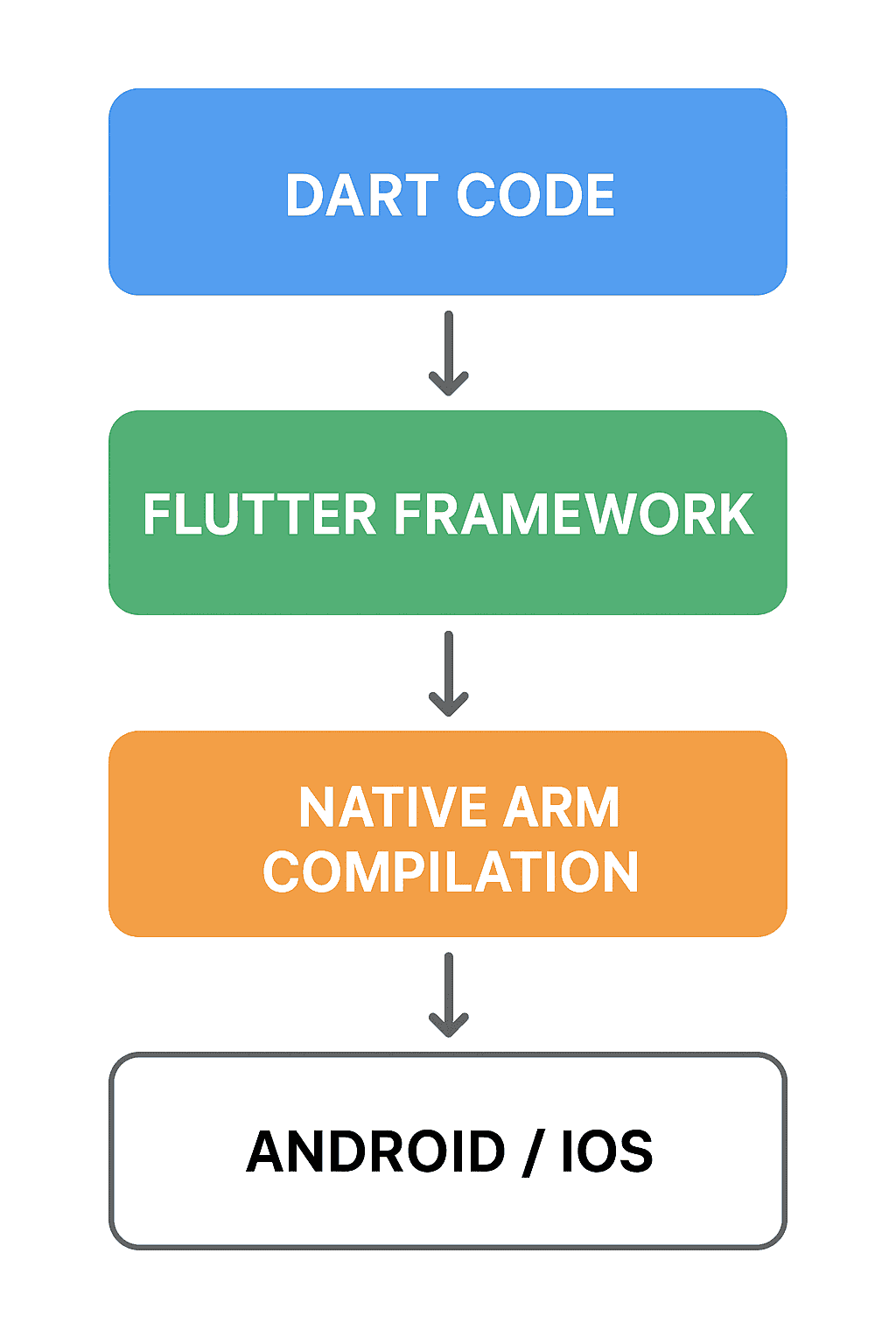
What makes Flutter different from previous cross-platform attempts is that it goes beyond JavaScript bridges or WebViews. Instead, Flutter compiles directly to native ARM code, which gives your app genuine native performance. When you’re building a Flutter app, you’re not creating a wrapper around web content—you’re building real mobile applications.
At the heart of Flutter lies its programming language, Dart, which is another Google product. The appeal of Dart lies in the fact that it is remarkably easy to pick up, especially if you have mastered the basics like JavaScript, Java, or C#. The result: Most developers hone their skills in Flutter basics within days, not months.
Is Flutter Still Relevant in 2026?
A common concern around Flutter stems from Google’s reputation for discontinuing products, which naturally raises the question: Will Flutter be next? The reality is that Flutter is not only safe but more relevant than ever in 2025.
First, Flutter is deeply embedded in Google’s own ecosystem. Core products such as Google Ads, Google Pay, and several internal tools are built with Flutter, making it highly unlikely that Google would abandon a framework tied directly to its revenue and internal operations.
Second, Flutter has been massively successful. The framework boasts over 700,000 published apps on app stores, with thousands of packages and plugins making it a full-fledged ecosystem with enormous capabilities. Major companies have invested millions in Flutter development. You don’t walk away from that kind of momentum.

Third, Recent Flutter 3.x releases (as of 2025) clearly demonstrate Google’s attempt to double down with improvements to performance, new platform integrations, and enhanced developer tools. Had it been a soon-to-be-dead project, it would scarcely have gotten active development or received regular updates, new features, and expanding platform support.
Some developers wonder, “Is Flutter a dead language?” This question is itself a misnomer as Flutter isn’t a language at all. Dart is the language, while Flutter is the framework. And neither is dead. According to the Stack Overflow Developer Survey, Dart consistently ranks in the top 20 programming languages, and its usage continues growing primarily because of Flutter’s success.
Can Flutter Be Used for Mobile App Development?
This question comes up more than you’d think, and the answer is a resounding yes. Flutter is a pro at mobile app development, which explains why major companies have bet their mobile strategies on Flutter.
Flutter Apps Examples in the Wild:
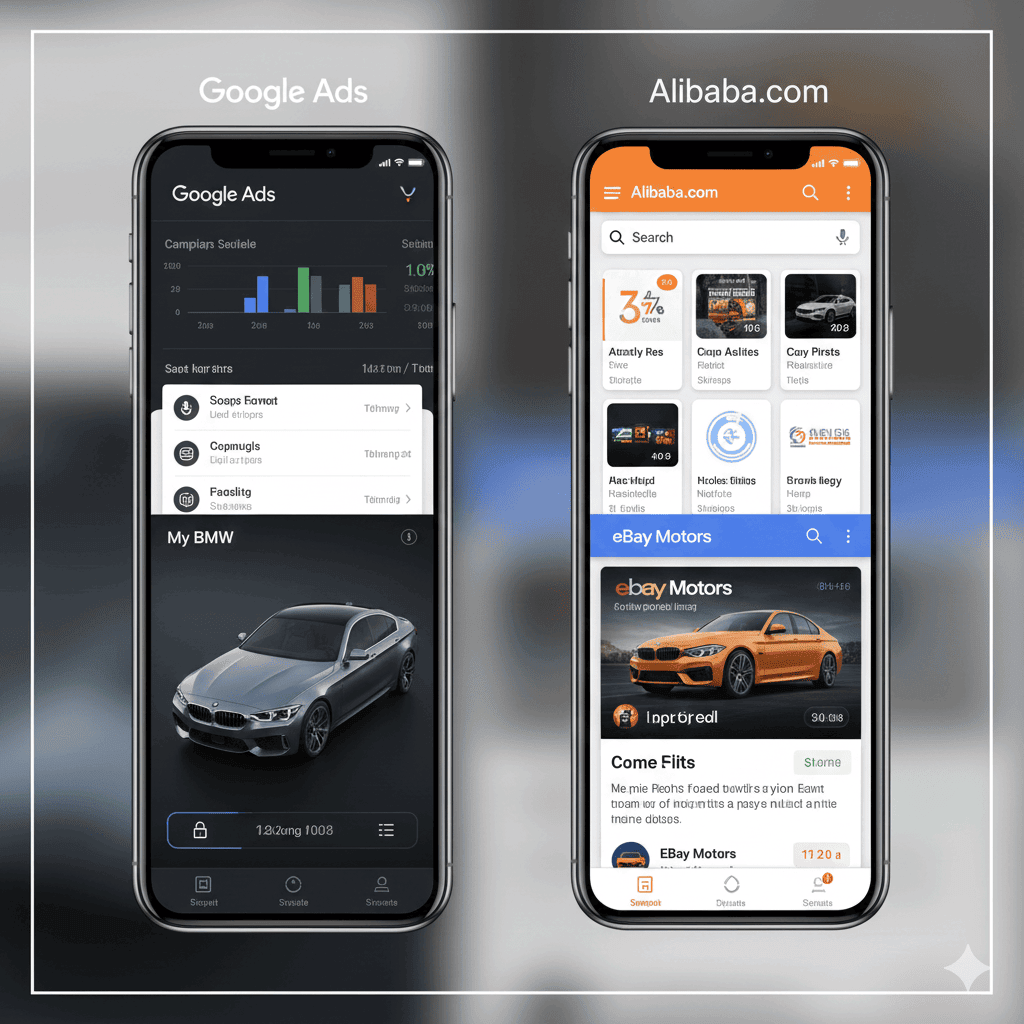
Some of the world’s most sought-after applications, like Google Ads, Alibaba, BMW, eBay Motors, and Reflectly, utilise Flutter. These Flutter app examples aren’t simple demo apps or side projects but production applications serving millions of users daily and delivering smooth user experiences across devices.
The Google Ads app manages billions of dollars in advertising spend. If Flutter couldn’t handle mission-critical applications, Google wouldn’t trust it with its cash cow. For instance, eBay Motors processes vehicle sales worth millions while BMW uses Flutter for customer-facing applications that represent their premium brand. These aren’t companies that take technology risks lightly.

For a business with a Flutter application, the framework delivers on its core promise: write once, deploy everywhere, without sacrificing quality. This not only saves crucial development time but also a uniform codebase makes it easy to fix bugs quickly, implement feature updates, and lower long-term maintenance costs.
Can Flutter Be Used for Mobile App Development?
Flutter Mobile App Development Advantages: Why Developers Choose It
What makes Flutter a go-to choice for mobile app development?
Single Codebase, Multiple Platforms
Write your app once, deploy it on iOS, Android, web, Windows, macOS, and Linux. For any business with Flutter application, this dramatically reduces development costs and time-to-market. Instead of maintaining separate iOS and Android teams, you have one team working in one codebase.
Hot Reload
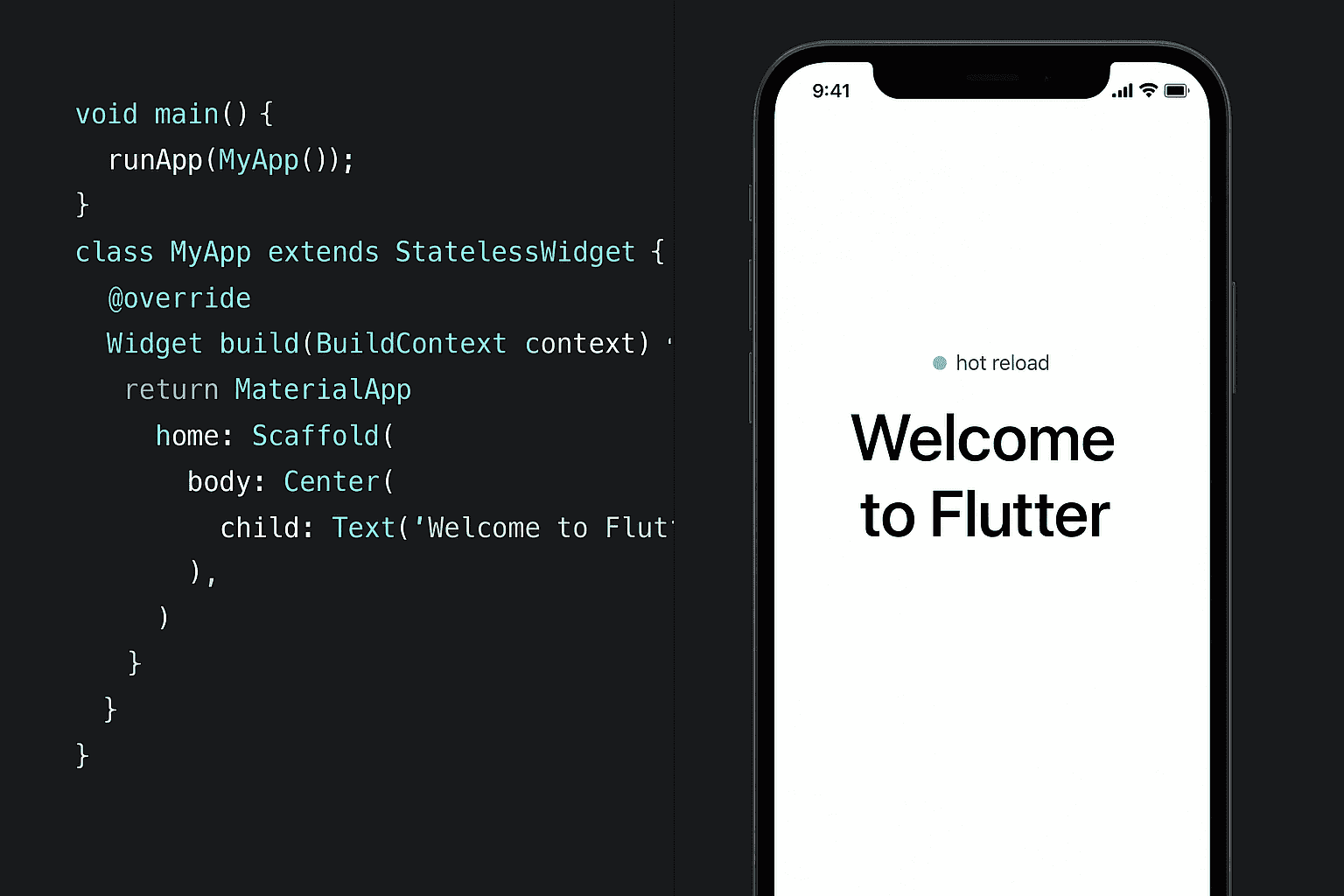
This feature alone converts developers. This allows them to make changes to code and view it instantly in your running app—without losing state. This effectively means no rebuilding, no wait periods, and no app restarts. This might sound minor, but it drastically transforms the development experience. You iterate faster, experiment more freely, and fix bugs quickly.
Beautiful UI Out of the Box
Flutter’s widget library is comprehensive and gorgeous. Material Design and Cupertino widgets give you UI components customised for specific platforms. The Custom designs are equally geared to facilitate wide-ranging preferences. If you are looking for pixel-perfect control, Flutter gives you that. The framework renders everything itself, making it relatively simple to maintain a cohesive brand identity without having to contend with debugging platform-specific UI quirks.
Top-notch Performance
Flutter apps deliver fast, fluid performance because they compile directly into native ARM code. This direct compilation discards common performance bottlenecks like the JavaScript bridge lag and WebView rendering jank, ensuring your applications run at a consistently smooth 60 frames per second (or 120fps on supported hardware).
Strong Typing and Null Safety
Dart’s type system adeptly catches errors at compile time, not runtime. The feature of null safety eliminates entire categories of crashes, leading to a more reliable code. Since you can pin down bugs easily, the overall app architecture is more stable.
Growing Ecosystem
Pub.dev, Flutter’s package repository, hosts over 50,000 packages covering everything from Firebase integration to payment processing, maps, camera access, and push notifications. There’s a well-maintained package for virtually everything. And if there isn’t, Flutter has built-in capabilities to write platform-specific code when needed.
Flutter Mobile App Development Disadvantages: The Real Challenges
Like everything else, Flutter is far from perfect and comes with legitimate drawbacks you should know about before committing.
App Size
Flutter apps are larger than native apps. Simply speaking, a simple “Hello World” Flutter app can be 4-5 MB, while feature-rich applications can take up 20-30 MB or more. In regions with limited connectivity or expensive data plans, this can be a major limitation. Native apps are typically smaller because they leverage platform frameworks already on the device.
Platform-Specific Features
When Apple or Google releases a new OS feature, you wait for Flutter support while Native developers enjoy immediate access. Flutter’s team is actively working to bridge the gap and implement new features within weeks or months, but the lag nonetheless exists. This can be problematic if your app is heavily dependent on cutting-edge platform features.
Learning Curve for Dart
Despite being easy to learn, Dart is a different ball game altogether as far as programming requirements are concerned. Most developers are well-versed in Swift or Kotlin, so Dart demands an upgrade in expertise. It’s manageable if you have a small team or individual developers, but retraining can be cost-intensive in large organisations with established native teams.

Limited Native Libraries
Some specialized native libraries don’t feature Flutter equivalents or bindings, which makes it necessary to write platform channels to communicate between Flutter and native code. Although practically possible, it adds a layer of complexity and defeats some of the “write once” advantages.
Debugging Native Issues
When problems occur at the platform level (which is rare but happens), debugging requires native expertise. Having Flutter knowledge won’t suffice, as you’ll need developers proficient in iOS and Android internals.
Flutter Basics: What You Need to Get Started
If you’re considering Flutter mobile app development, the learning path looks like this ;
Understanding Widgets
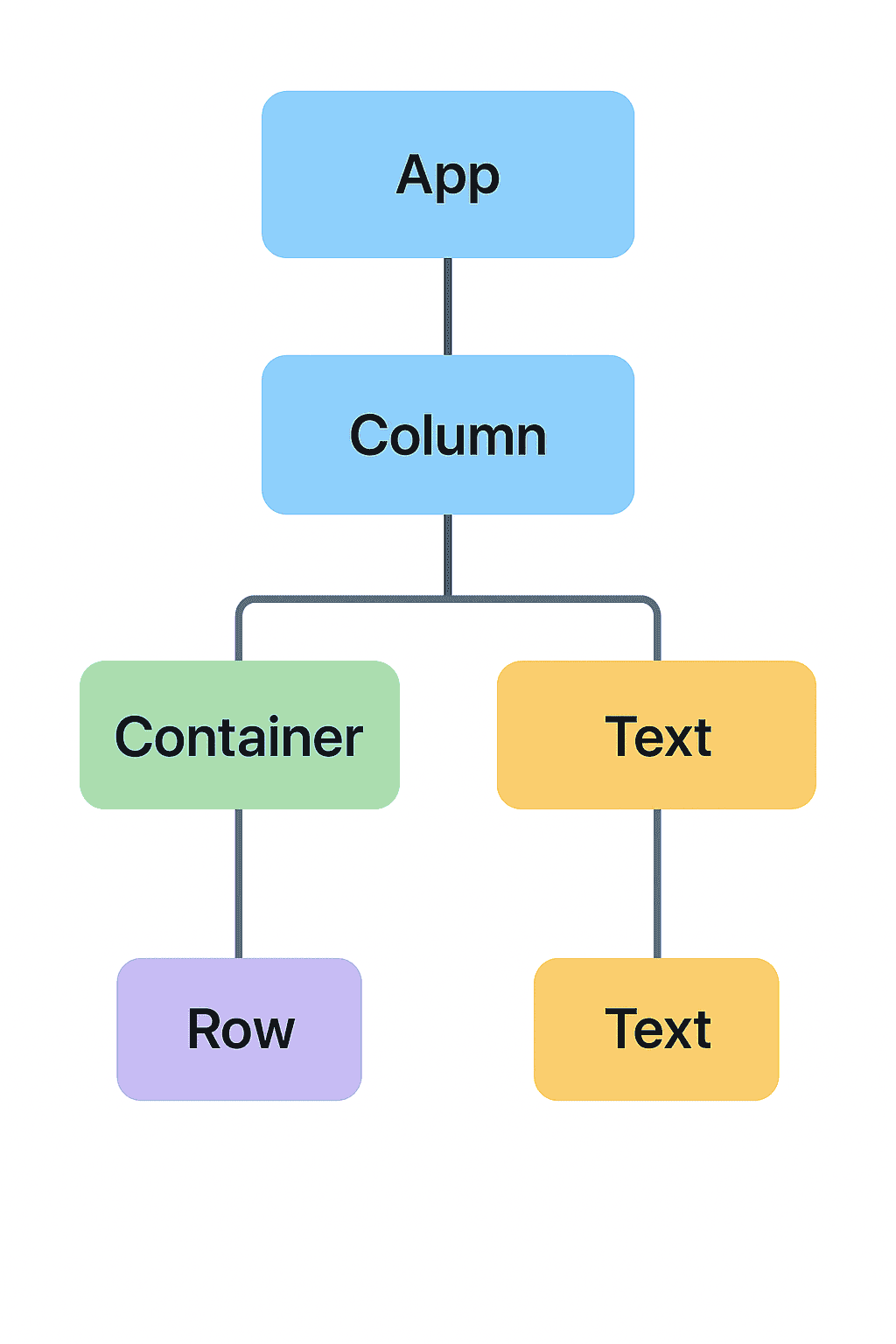
Flutter is all about widgets. Not only are Buttons and text widgets, but the entire layout and the app itself have been designed as a widget. Once you internalise this concept, Flutter’s development philosophy can be reduced to combining simple widgets to create compelling UI.
Stateless vs. Stateful Widgets
Stateless widgets don’t change. In comparison, Stateful widgets can rebuild when their state changes. Understanding when to use each is fundamental to efficient Flutter development.
Layout System
Flutter’s layout approach differs from HTML/CSS or native constraints. It gives you access to flex layouts, stacks, rows, columns, and containers. It’s intuitive once you grasp it, but it requires practice.
State Management
Flutter offers multiple state management solutions, ranging from Provider, Riverpod, and Bloc to MobX, GetX. Each has its own proponents and use cases. For instance, Provider or Riverpod are excellent beginner-friendly tools, while Bloc is well-suited to build robust architecture in complex applications.
Platform Channels
If you expect to integrate native functionality, platform channels let Flutter communicate with Swift/Kotlin code. You define a channel, send messages across it, and handle responses. Despite being more involved than pure Flutter code, it’s not that complex.
Business with Flutter Application: The Commercial Reality
Apart from its development expertise, Flutter mobile app development makes compelling financial sense in many scenarios.
Faster Time to Market
The fact that you could build a single app instead of two expedites time to market. For startups, this holds a significant competitive advantage while enabling established businesses to respond to ever-changing market demands.

Reduced Development Costs
Flutter gives you the luxury of zeroing in on development while curtailing your development budget. The fact that a single team can look into development with a single code and iterations happen simultaneously means you no longer have to worry about maintaining separate native apps. This is accompanied by a drop in development costs by 30-50%, which justifies investing in Flutter in the first place.
Consistent User Experience
Your iOS and Android apps look and behave identically. This consistency strengthens brand identity and makes you recognizable to your target user on different platforms.
Easier Maintenance
Maintenance becomes seamless and less stressful as changes are equally applied, whether you fix a bug or add a feature.
Quality Talent Pool
The high demand for Flutter developers is matched by a steady supply of talent. In fact, it is easier to find good Flutter developers than to find great Swift and Kotlin developers individually. Similarly, you can train existing web developers on Flutter basics faster than training them on two native platforms.
That said, Flutter isn’t always the right choice. For apps with simple and platform-specific features, native development might be a reasonable option. If you have well-structured native teams and established codebases, migration costs might outweigh Flutter’s benefits. Finally, if you are aiming at maximum performance, as in the case of intensive 3D gaming, native development might give you an edge.
The Verdict of Flutter Mobile App Development: Is Flutter Really That Good?
In view of what’s been said above, one can safely say that Flutter qualifies for most use cases. There can be no doubt about the relevance of Flutter in 2026, as the framework is geared to become more mature with a fantastic suite of tools and a thriving community of Flutter supporters.
Will Flutter be killed by Google? This appears highly unlikely given its pivotal role as a driving force behind Google’s own products and its value for the developer community.
For businesses evaluating Flutter mobile app development advantages, a combination of cost savings, quick development, and a single codebase often surpasses any disadvantages. For developers, Flutter offers a productive, seamless development experience coupled with lucrative job prospects.
No technology can ever be perfect, and Flutter mobile app development disadvantages cannot be ignored as we welcome 2026. That said, Flutter app examples represent one of the most mature, capable, and practical approaches to cross-platform mobile app development. Ultimately, the real question isn’t as much whether Flutter is good enough as whether it’s the right tool for your specific needs.